
Controlling The Rear Climate Controls From The Front ATC Panel
The Three-Zone ATC system allows for adjustment of the rear climate controls from the front ATC panel.
To change the rear system settings:
1. Press REAR button to change control to rear control mode, Rear display (below) will appear. Control functions now operate rear system.
2. To return to Front screen, press REAR button again, or it will revert to the Front screen after six seconds.
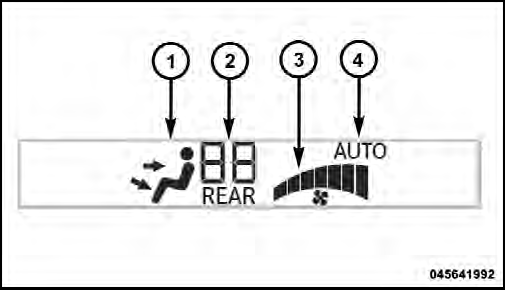
Front ATC Panel Rear Control Display
1. Mode Display
This display shows the current Mode selection.
2. Rear Temperature Display
This display shows the temperature setting for the rear seat occupants.
3. Blower Control Display
This display shows the current Blower speed selection.
4. Rear Auto Indicator
This indicates when the system is in Rear Auto mode.
See also:
Onboard Diagnostic System — OBD II
Your vehicle is equipped with a sophisticated onboard
diagnostic system called OBD II. This system monitors
the performance of the emissions, engine, and automatic
transmission control systems. ...
Turns And Bends
In turns or bends, ACC may detect a vehicle ahead too
late or too early. This may cause your vehicle to brake late
or unexpectedly. Give extra attention in curves and be
ready to apply the brake ...
Headlight Delay — If Equipped
This feature provides the safety of headlight illumination
for up to 90 seconds after exiting your vehicle.
To activate the delay feature, turn OFF the ignition switch
while the headlights are st ...