
Display
Other Language Setup
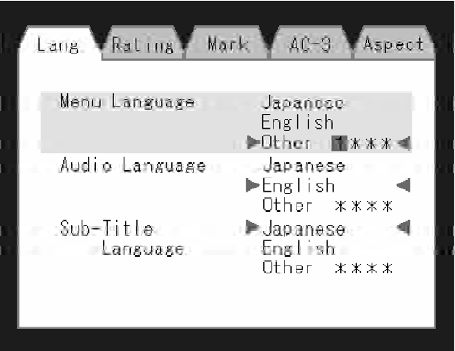
DVD Player Language Menu
All of the Language settings have a special Other setting to accommodate languages other than Japanese or English.
These languages are selected using a special four-digit code.
To enter a new language code, activate the DVD Setup Menu. To enter DVD Setup Menu stop the DVD, enter radio disc mode, then DVD setup and follow these additional instructions:
• Using the remote control Up and Down cursor buttons, highlight the Language item you want to edit, and then press the remote control ENTER button.
• Using the remote control Down cursor button, select the Other setting, then press the remote control’s Right cursor button to begin editing the setting.
• Using the remote control Up and Down cursor buttons, select a digit for the current position. After selecting the digit, press the remote control’s Right cursor button to select the next digit. Repeat this digit selection sequence for all four digits.
• When the entire four-digit code is entered, press the remote control’s ENTER button. If the language code is not valid, the numbers all change back to * . If the digits are visible after this step, then the language code is valid.
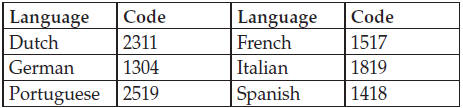
Here is an abbreviated list of language codes. For more language codes, please contact the dealer where the vehicle was purchased.
See also:
Installing Child Restraint Tether Strap
1. Rotate the cover over the anchor directly behind the
seat where you are placing the child restraint.
Installing Child Restraint Tether Strap
1 — Cover
3 — Attaching Strap
A — Tether ...
Keyless Enter-N-Go
The Passive Entry system is an enhancement to the
vehicle’s Remote Keyless Entry (RKE) system and a
feature of Keyless Enter-N-Go. This feature allows you to
lock and unlock the vehicle’s do ...
Remote Starting System — If Equipped
This system uses the Remote Keyless Entry
(RKE) transmitter to start the engine conveniently
from outside the vehicle while still
maintaining security. The system has a range of
approximatel ...