
Information Mode Display
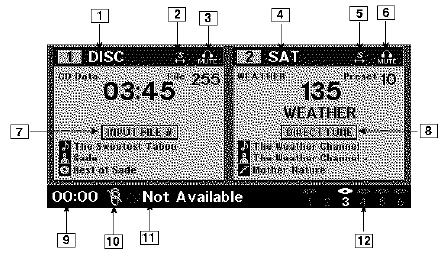
Information Mode Video Screen Display
1. Channel 1 Mode
2. Channel 1 Shared Status
3. Channel 1 Audio Only/Mute
4. Channel 2 Mode
5. Channel 2 Shared Status
6. Channel 2 Audio Only/Mute
7. Channel 1 ENTER Button Action
8. Channel 2 ENTER Button Action
9. Clock
10. Video Lock
11. Not Available / Error
12. Disc Changer Status
See also:
Cleaning The Parksense System
Clean the ParkSense sensors with water, car wash soap
and a soft cloth. Do not use rough or hard cloths. Do not
scratch or poke the sensors. Otherwise, you could damage
the sensors. ...
Turn Menu Off
Press and release SELECT to turn the menu off. ...
ESC Operating Modes
The “ESC Off” switch is located in the center
switch bank, next to the hazard flasher switch.
ESC On
This mode is the normal operating mode for ESC on
two-wheel drive vehicles. Whenever ...