
Using The Touch Screen Radio Controls
1. Press the MENU hard-key on the radio faceplate.
2. Touch the Rear VES soft-key to display the Rear VES Controls. If a channel list is displayed, touch the HIDE LIST soft-key to display the Rear VES Controls screen.

Rear VES Soft-key
3. To listen to an audio source on Channel 1 while a video is playing on Channel/Screen 2, touch the 1 soft-key and choose an audio source. To listen to an audio source on Channel 2 while a video is playing on Channel/Screen 1, touch the 2 soft-key and choose an audio source. To exit touch the back arrow soft-key at the top left of the screen.
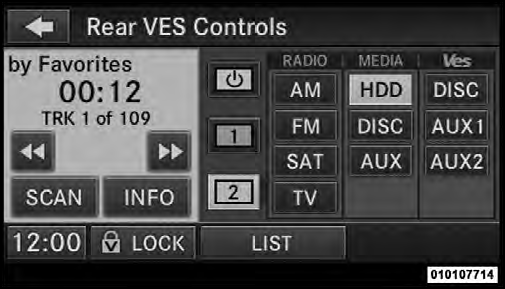
Select Channel/Screen 2 And HDD In The MEDIA Column
See also:
Using HomeLink
To operate, press and release the programmed
HomeLink button. Activation will now occur for the
programmed device (i.e., garage door opener, gate operator,
security system, entry door lock, home ...
Electronic Vehicle Information Center (EVIC) — If Equipped
The Electronic Vehicle Information Center (EVIC) features
a driver-interactive display that is located in the
instrument cluster.
Electronic Vehicle Information Center (EVIC)
This system conve ...
Managing Your Favorite Phonebook
There are three ways you can add an entry to your
Favorite Phonebook.
1. During an active call of a number to make a favorite,
touch and hold a favorite button on the top of the phone
main scre ...