
Using The Remote Control
1. Press the MODE button on the Remote Control and either the Mode Select Screen will display or a small banner will appear at the bottom of the screen.
2. To listen to an audio source on Channel 1 or 2, either press Up/Down/Left/Right on the Remote Control to highlight the desired audio source or press the MODE button repeatedly until the desired audio source appears on the screen.
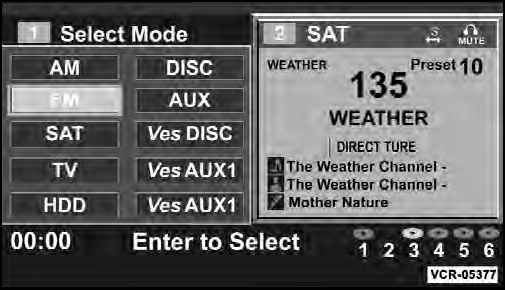
Select FM Mode On The VES screen
See also:
Rear Temperature Control
To change the temperature in the rear of the vehicle,
rotate the temperature knob counterclockwise to lower
the temperature, and clockwise to increase the temperature.
The rear temperature settin ...
Illuminated Vanity Mirrors — If Equipped
An illuminated vanity mirror is located on the sun visor.
To use the mirror, rotate the sun visor down and swing
the mirror cover upward. The lights turn on automatically.
Closing the mirror cover ...
Mute/Un-Mute (Mute OFF)
When you mute the Uconnect™ Phone, you will still be
able to hear the conversation coming from the other
party, but the other party will not be able to hear you. In
order to mute the Uconnectâ ...