
Using The Touch-Screen Radio Controls
1. Press the MENU hard-key on the radio faceplate.
2. Touch the Rear VES soft-key to display the Rear VES Controls. If a channel list is displayed, touch the HIDE LIST soft-key to display the Rear VES Controls screen.

Rear VES Soft-key
3. Touch the 1 or 2 soft-key and then the DISC soft-key in the VES column. To exit touch the back arrow soft-key at the top left of the screen.
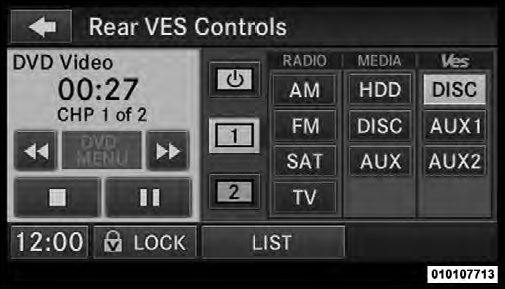
Select Channel/Screen 1 And DISC In The VES Column
NOTE:
• To view a DVD on the radio press the RADIO/MEDIA
hard-key, on the radio faceplate, then touch the DISC
tab soft-key and then the VIEW VIDEO soft-key.
• Viewing a DVD on the Touch-Screen radio screen is
not available in all states/provinces, and the vehicle
must be stopped, and the shift lever must be in the
PARK position for vehicles with automatic transmission.
In vehicles with manual transmission the parking
brake must be engaged.
See also:
TUNE Control (Rotary)
Turn the rotary TUNE/SCROLL control knob clockwise
to increase or counterclockwise to decrease the channel. ...
Adjustable Upper Shoulder Belt Anchorage
In the front seat, the shoulder belt can be adjusted
upward or downward to position the belt away from
your neck. Push anchorage button to release the anchorage,
and move it up or down to the po ...
Smartbeam™ — If Equipped
The SmartBeam™ system provides increased forward
lighting at night by automating high beam control
through the use of a digital camera mounted on the
inside rearview mirror. This camera detect ...