
MUSIC TYPE Button
Pressing this button once will turn on the Music Type mode for five seconds. Pressing the MUSIC TYPE button or turning the TUNE/SCROLL control knob within five seconds will allow the program format type to be selected.
Many radio stations do not currently broadcast Music Type information.
Toggle the MUSIC TYPE button to select the following format types:
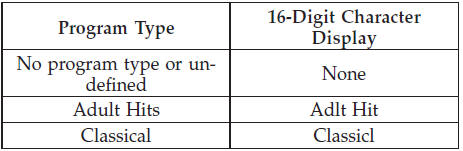
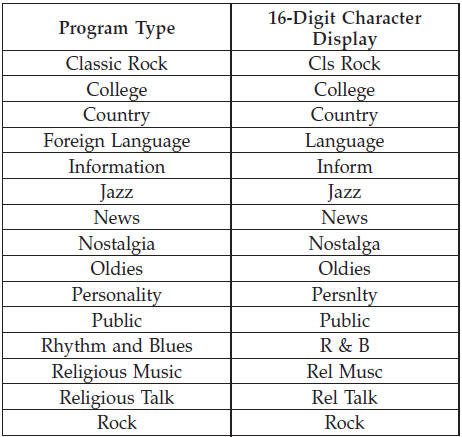
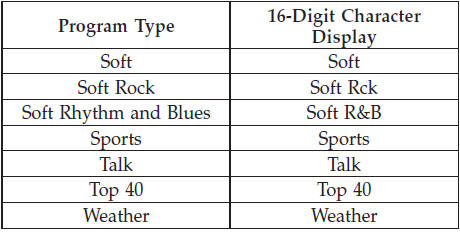
By pressing the SEEK button when the Music Type icon is displayed, the radio will be tuned to the next frequency station with the same selected Music Type name. The Music Type function only operates when in the FM mode.
If a preset button is activated while in the Music Type (Program Type) mode, the Music Type mode will be exited and the radio will tune to the preset station.
See also:
Tire PSI
Press and release the UP or DOWN button until Tire PSI
is highlighted in the EVIC. Press and release the SELECT
button and one of the following will be displayed:
• If tire pressure is OK for ...
Ethanol Fuel (E-85)
E-85 is a mixture of approximately 85% fuel ethanol and
15% unleaded gasoline.
WARNING!
Ethanol vapors are extremely flammable and could
cause serious personal injury. Never have any smoking
m ...
Electronic Volume Control
The electronic volume control turns continuously (360
degrees) in either direction, without stopping. Turning
the ON/VOLUME control knob to the right increases the
volume, and to the left decrea ...