
Instrument Panel Features
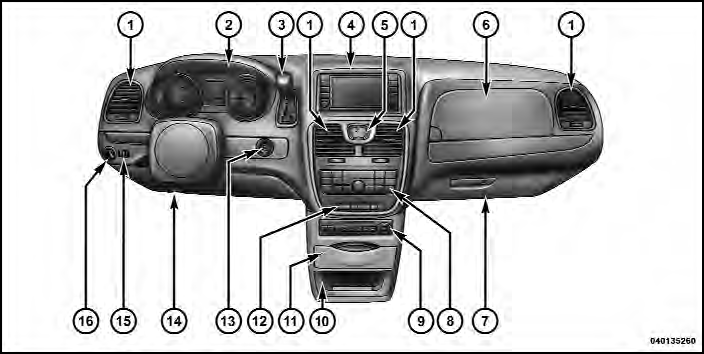
Instrument Panel Features
1 — Air Vents
2 — Instrument Cluster
3 — Shift Lever
4 — Radio
5 — Analog Clock
6 — Upper Glove Compartment
7 — Lower Glove Compartment
8 — Climate Controls
9 — DVD – If Equipped
10 — Storage Bin
11 — Cup Holders
12 — Switch Bank
13 — Ignition Switch
14 — Hood Release
15 — Dimmer Switch
16 — Headlight Switch
See also:
Sunglass Storage (Non-Sunroof Only)
At the front of the overhead console, a compartment is
provided for the storage of two pairs of sunglasses.
From the closed position, press the door latch to open the
compartment.
Over Door La ...
AutoStick – If Equipped
− By using the AutoStick mode and selecting a specific
gear range, frequent shifting can be avoided. Select the
highest gear range that allows for adequate performance
and avoids frequent ...
Compass Variance
Compass Variance is the difference between Magnetic
North and Geographic North. To compensate for the
differences the variance should be set for the zone where
the vehicle is driven, per the zon ...