
Adjustable Pedals — If Equipped
The adjustable pedals system is designed to allow a greater range of driver comfort for steering wheel tilt and seat position. This feature allows the brake, accelerator, and clutch pedals (if equipped) to move toward or away from the driver to provide improved position with the steering wheel.
The switch is located on the left side of the steering column.
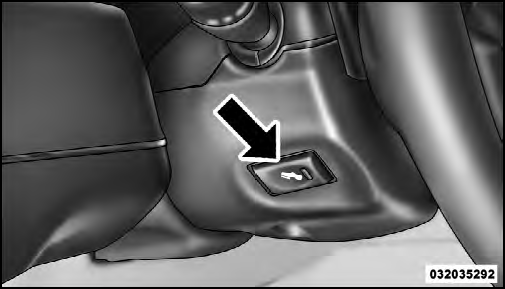
Adjustable Pedal Switch
Press the switch forward to move the pedals forward (toward the front of the vehicle).
Press the switch rearward to move the pedals rearward (toward the driver).
• The pedals can be adjusted with the ignition OFF.
• The pedals cannot be adjusted when the vehicle is in REVERSE or when the Electronic Speed Control System is on. The following messages will be displayed on vehicles equipped with the Electronic Vehicle Information System (EVIC) if the pedals are attempted to be adjusted when the system is locked out (“Adjustable Pedal Disabled — Cruise Control Engaged” or “Adjustable Pedal Disabled — Vehicle In Reverse”.
CAUTION!
Do not place any article under the adjustable pedals
or impede its ability to move, as it may cause damage
to the pedal controls. Pedal travel may become limited
if movement is stopped by an obstruction in the
adjustable pedal’s path.
WARNING!
Do not adjust the pedals while the vehicle is moving.
You could lose control and have an accident. Always
adjust the pedals while the vehicle is parked.
See also:
Deleting A Phone Or Audio Device
• Touch the “Settings” soft-key,
• Touch the Phone/Bluetooth soft-key,
• Touch the + soft-key located to the right of the device name for a different
Phone or Audio Device than the curre ...
Windshield Wipers And Washers
The multifunction lever operates the windshield wipers
and washer when the ignition is placed in the ON/RUN
or ACC position. The multifunction lever is located on
the left side of the steering c ...
Dial By Saying A Number
• Press the button to begin.
• After the “Ready” prompt and the following beep, say
“Dial”.
• The system will prompt you to say the number you
want to call.
• For example, you ...