
Tilt/Telescoping Steering Column
This feature allows you to tilt the steering column upward or downward. It also allows you to lengthen or shorten the steering column. The tilt/telescoping lever is located below the steering wheel at the end of the steering column.
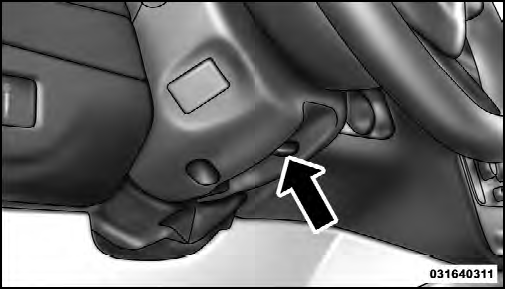
Tilt/Telescoping Lever
To unlock the steering column, push the lever downward (toward the floor). To tilt the steering column, move the steering wheel upward or downward as desired. To lengthen or shorten the steering column, pull the steering wheel outward or push it inward as desired. To lock the steering column in position, push the lever upward until fully engaged.
WARNING!
Do not adjust the steering column while driving.
Adjusting the steering column while driving or driving
with the steering column unlocked, could cause
the driver to lose control of the vehicle. Be sure the
steering column is locked before driving your vehicle.
Failure to follow this warning may result in
serious injury or death.
See also:
Exhaust System
The best protection against carbon monoxide entry into
the vehicle body is a properly maintained engine exhaust
system.
If you notice a change in the sound of the exhaust system;
or if the exha ...
E-85 General Information
The information in this section is for Flexible Fuel vehicles
only. These vehicles can be identified by a unique
fuel filler door label that states Ethanol (E-85) or Unleaded
Gasoline Only. This ...
Seat Belts And Pregnant Women
We recommend that pregnant women use the seat belts
throughout their pregnancy. Keeping the mother safe is
the best way to keep the baby safe.
Pregnant women should wear the lap part of the belt ...