
Third Row Power Folding Seat — If Equipped
A one-touch power folding seat switch is located in the left rear trim panel as part of a switch bank.
NOTE:
Lower the head restraint by pulling on the
release strap marked “1” located on the outboard side of
the head restraint.

Head Restraint Release Strap “1”
The switch is only functional when the liftgate is open and the vehicle is in PARK.
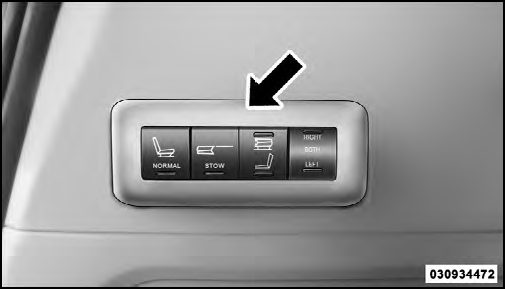
One Touch Folding Seat Third Row
The rear switch bank allows multiple power folding and unfolding positions for the third row seats.
Left and right third row seats can be folded individually or together. The third row power folding seat adjusts to the following positions using the switch bank located on the left rear trim panel:

Rear Panel Power Switch Bank
1 — Open to Normal
2 — Stow
3 — Tailgate/Fold Flat
4 — Right/Left Seats/Both Seats
NOTE:
• Disconnect the center shoulder belt from the small
buckle and lower the head restraints before attempting
to fold/stow the power third row seats.
• To abort seat operation while seat is in motion, press a
different seat position selector switch to stop the seat.
Once the seat stops moving, then the desired position
can be selected.
• The third row power seat system includes obstacle
detection for safe operation. When the system detects
an obstacle, the motors will stop and reverse the
motion a short distance to move the seat away from
the obstacle. Should this occur, remove the obstacle
and press the button again, for the desired position.
See also:
Exterior Mirrors Folding Feature
All exterior mirrors are hinged and may be moved either
forward or rearward to resist damage. The hinges have
three detent positions: full forward, full rearward and
normal. ...
To Lock The Doors
Press and release the LOCK button on the RKE transmitter
to lock all doors. The turn signal lights will flash and
the horn will chirp to acknowledge the signal.
If the vehicle is equipped with Pa ...
To Deactivate
Perform either of the following steps to deactivate the
SmartBeam™ system.
1. Select “Automatic High Beams — OFF” through the
EVIC. Refer to “Electronic Vehicle Information Center
(EV ...