
Rear Cross Path
The Rear Cross Path (RCP) feature is intended to aid the driver when backing out of parking spaces where their vision of oncoming vehicles may be blocked. Proceed slowly and cautiously out of the parking space until the rear end of the vehicle is exposed. The RCP system will then have a clear view of the cross traffic and if an oncoming vehicle is detected, alert the driver.
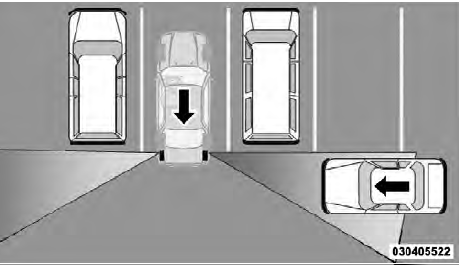
RCP Detection Zones
RCP monitors the rear detection zones on both sides of the vehicle, for objects that are moving toward the side of the vehicle with a minimum speed of approximately 1 to 2 mph (1 km/h to 3 km/h), to objects moving a maximum of approximately 10 mph (16 km/h), such as in parking lot situations.
NOTE:
In a parking lot situation, oncoming vehicles can
be obscured by vehicles parked on either side. If the
sensors are blocked by other structures or vehicles, the
system will not be able to alert the driver.
When RCP is on and the vehicle is in REVERSE, the driver is alerted using both the visual and audible alarms, including radio muting.
WARNING!
RCP is not a Back Up Aid system. It is intended to be
used to help a driver detect an oncoming vehicle in a
parking lot situation. Drivers must be careful when
backing up, even when using RCP. Always check
carefully behind your vehicle, look behind you, and
be sure to check for pedestrians, animals, other
vehicles, obstructions, and blind spots before backing
up. Failure to do so can result in serious injury or
death.
See also:
Smartbeam™ — If Equipped
The SmartBeam™ system provides increased forward
lighting at night by automating high beam control
through the use of a digital camera mounted on the
inside rearview mirror. This camera detect ...
Adjustable Upper Shoulder Belt Anchorage
In the front seats and the second row outboard seats, the
shoulder belt anchorage can be adjusted upward or downward
to help position the belt away from your neck. The
upper anchorage can be adj ...
Opening The Sunroof — Manual Mode
To open the sunroof, press and hold the switch rearward
to full open. Any release of the switch will stop the
movement and the sunroof will remain in a partially
opened condition until the switc ...