
Customer Programmable Features — Uconnect Touch™ System 8.4 Settings
Press the More soft-key, then press the Settings soft-key to display the menu setting screen. In this mode the Uconnect Touch™ system allows you to access programmable features that may be equipped such as Display, Clock, Safety/Assistance, Lights, Doors & Locks, Auto-On Comfort & Remote Start, Engine Off Operation, Compass Settings, Audio, Phone/Bluetooth and SIRIUS Setup.
NOTE:
Only one touchscreen area may be selected at a
time.
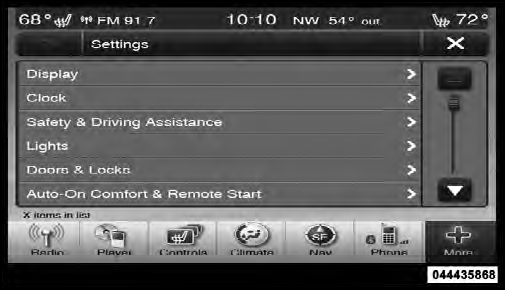
Uconnect Touch™ 8.4 Soft-Keys
When making a selection, press the soft-key to enter the desired mode. Once in the desired mode press and release the preferred setting until a check-mark appears next to the setting, showing that setting has been selected.
Once the setting is complete press the Back Arrow soft-key to return to the previous menu or press the X soft-key to close out of the settings screen. Pressing the Up or Down Arrow soft-keys on the right side of the screen will allow you to toggle up or down through the available settings.
See also:
NEUTRAL
Use this range when the vehicle is standing for prolonged
periods with engine running. The engine may be started
in this range. Set the parking brake and shift the transmission
into PARK if you ...
Turning Parkview On Or Off — Without Navigation/Multimedia Radio
1. Press the “menu” hard-key.
2. Select “system setup” soft-key.
3. Enable or disable the rear camera feature by selecting
“enable rear camera in reverse” soft-key. ...
Replacement Keys
NOTE:
Only Key Fobs that are programmed to the
vehicle electronics can be used to start and operate the
vehicle. Once a Key Fob is programmed to a vehicle, it
cannot be reprogrammed to any othe ...