
Instrument Panel Features
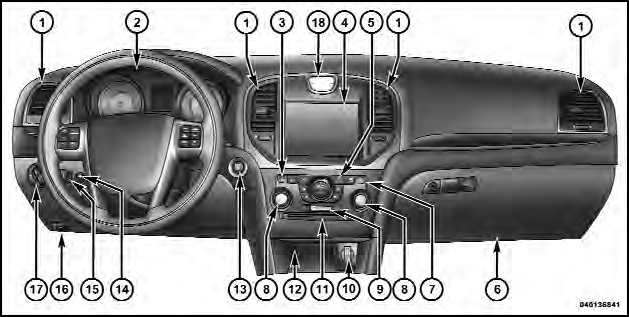
Instrument Panel Features
1 — Air Outlet
2 — Instrument Cluster
3 — Hazard Switch
4 — Uconnect Touch™ System
5 — Climate Control Hard Controls
6 — Glove Compartment
7 — ESC Off Switch
8 — Uconnect Touch™ System Hard Controls
9 — SD Memory Card Slot
10 — Power Outlet
11 — CD/DVD Slot
12 — Storage Compartment
13 — Engine Start/Stop Button
14 — Trunk Release Button
15 — Dimmer Controls
16 — Hood Release
17 — Headlight Switch
18 — Analog Clock
See also:
Base System
The TPMS uses wireless technology with wheel rim
mounted electronic sensors to monitor tire pressure levels.
Sensors, mounted to each wheel as part of the valve
stem, transmit tire pressure readi ...
Air Conditioner Maintenance
For best possible performance, your air conditioner
should be checked and serviced by an authorized dealer
at the start of each warm season. This service should
include cleaning of the condenser ...
Uconnect Touch™ 8.4/8.4 NAV
Uconnect™ Phone is a voice-activated, hands-free, invehicle
communications system. Uconnect™ Phone allows
you to dial a phone number with your mobile
phone.
Uconnect™ Phone supports the f ...