
Programming A Rolling Code
For programming garage door openers that were manufactured after 1995. These garage door openers can be identified by the “LEARN” or “TRAIN” button located where the hanging antenna is attached to the garage door opener. It is NOT the button that is normally used to open and close the door. The name and color of the button may vary by manufacturer.
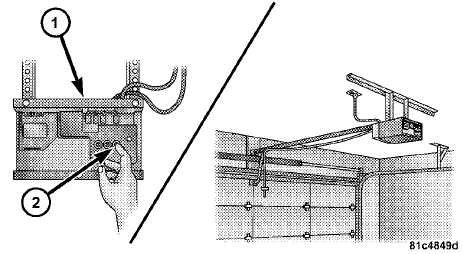
Training The Garage Door Opener
1 — Door Opener
2 — Training Button
1. Turn the ignition switch to the ON/RUN position.
2. Place the hand-held transmitter 1 to 3 in (3 to 8 cm) away from the HomeLink button you wish to program while keeping the HomeLink indicator light in view.
3. Simultaneously press and hold both the Homelink button you want to program and the hand-held transmitter button.
4. Continue to hold both buttons and observe the indicator light. The Homelink indicator will flash slowly and then rapidly after Homelink has received the frequency signal from the hand-held transmitter. Release both buttons after the indicator light changes from slow to rapid.
5. At the garage door opener motor (in the garage), locate the “LEARN” or “TRAINING” button. This can usually be found where the hanging antenna wire is attached to the garage door opener/device motor. Firmly press and release the “LEARN” or “TRAINING” button.
On some garage door openers/devices there may be a light that blinks when the garage door opener/device is in the LEARN/TRAIN mode.
NOTE:
You have 30 seconds in which to initiate the next
step after the LEARN button has been pressed.
6. Return to the vehicle and press the programmed HomeLink button twice (holding the button for two seconds each time). If the garage door opener/device activates, programming is complete.
NOTE:
If the garage door opener/device does not
activate, press the button a third time (for two seconds) to
complete the training.
To program the remaining two HomeLink buttons, repeat each step for each remaining button. DO NOT erase the channels.
Reprogramming A Single HomeLink Button
To reprogram a channel that has been previously trained, follow these steps:
1. Turn the ignition switch to the ON/RUN position.
2. Press and hold the desired HomeLink button until the indicator light begins to flash after 20 seconds. Do not release the button.
3. Without releasing the button proceed with “Programming A Rolling Code” Step 2 and follow all remaining steps.
See also:
Trailer Tongue Weight (TW)
The tongue weight is the downward force exerted on the
hitch ball by the trailer. In most cases it should not be less
than or more than 10% of the trailer load. You must
consider this as part of ...
Service Contract
You may have purchased a service contract for a vehicle
to help protect you from the high cost of unexpected
repairs after the manufacturer’s New Vehicle Limited
Warranty expires. The manufact ...
Supplemental Seat-Mounted Side Air Bags (SAB)
Supplemental Seat-Mounted Side Air Bags (SAB) may
provide enhanced protection to help protect an occupant
during a side impact. The SAB is marked with an air bag
label sewn into the outboard sid ...