
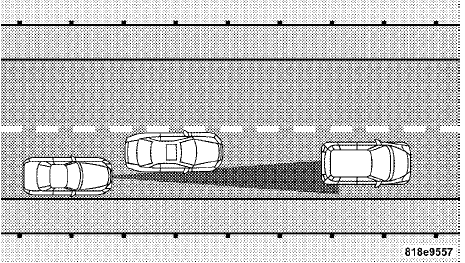
Offset Driving
ACC may not detect a vehicle in the same lane that is offset from your direct line of travel. There will not be sufficient distance to the vehicle ahead. The offset vehicle may move in and out of the line of travel, which can cause your vehicle to brake or accelerate unexpectedly.
See also:
Standard Shifter
The standard shift lever has PARK, REVERSE, NEUTRAL,
DRIVE, and LOW shift positions. Using the LOW
position manually downshifts the transmission to a
lower gear based on vehicle speed.
Shift ...
Lower Anchors and Tether for CHildren (LATCH)
Your vehicle’s rear seat is equipped with the child
restraint anchorage system called LATCH. The LATCH
system provides for the installation of the child restraint
without using the vehicle’s ...
Gasoline/Oxygenate Blends
Some fuel suppliers blend unleaded gasoline with oxygenates
such as Ethanol. Fuels blended with oxygenates
may be used in your vehicle.
CAUTION!
DO NOT use gasoline containing Methanol or gasoli ...