
Power Tilt/Telescoping Steering Column — If Equipped
This feature allows you to tilt the steering column upward or downward. It also allows you to lengthen or shorten the steering column. The power tilt/telescoping steering column switch is located below the multifunction lever on the steering column.
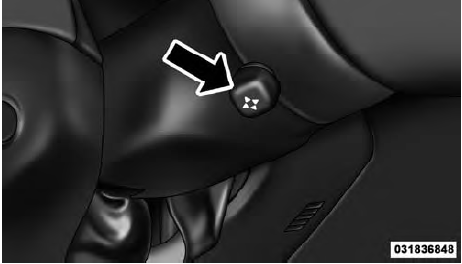
Power Tilt/Telescoping Steering Switch
To tilt the steering column, move the switch up or down as desired. To lengthen or shorten the steering column, pull the switch toward you or push the switch away from you as desired.
NOTE:
For vehicles equipped with Driver Memory
Seat, you can use your Remote Keyless Entry (RKE)
transmitter or the memory switch on the driver’s door
trim panel to return the tilt/telescopic steering column to
pre-programmed positions. Refer to “Driver Memory
Seat” in this section.
WARNING!
Do not adjust the steering column while driving.
Adjusting the steering column while driving or driving
with the steering column unlocked, could cause
the driver to lose control of the vehicle. Be sure the
steering column is locked before driving your vehicle.
Failure to follow this warning may result in
serious injury or death.
See also:
Cooling System – Drain, Flush, And Refill
If the engine coolant (antifreeze) is dirty or contains a
considerable amount of sediment, clean and flush with a
reliable cooling system cleaner. Follow with a thorough
rinsing to remove all de ...
Headlamps with Wipers (Available with Auto Headlights Only)
When ON is selected, and the headlight switch is in the
AUTO position, the headlights will turn on approximately
10 seconds after the wipers are turned on. The
headlights will also turn off when ...
Voice Tree
NOTE:
1. You can replace “950 AM” with any other AM or FM
frequency, such as “98.7 FM”.
2. You can replace “80’s on 8” with any other satellite
station name received by the radio ...