
Dimmer Controls
The dimmer control is part of the headlight switch and is located on the left side of the instrument panel.

Dimmer Controls
With the parking lights or headlights on, rotating the left dimmer control upward will increase the brightness of the instrument panel lights and lighted cupholders (if equipped).
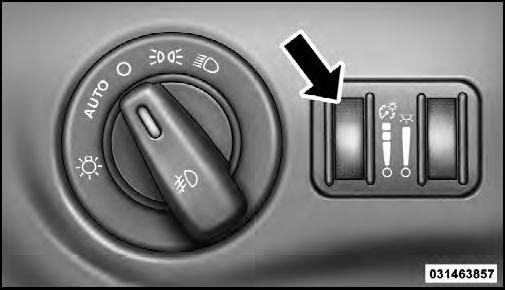
Instrument Panel Dimmer
See also:
Removal
The Quad seats can be removed if additional storage is
needed. With the seat in the easy entry position, lift the
cross beam forward and up to release the front anchor
latches.
Cross Beam for ...
HSA Activation Criteria
The following criteria must be met in order for HSA to
activate:
• Vehicle must be stopped.
• Vehicle must be on a 6% (approximate) grade or
greater hill.
• Gear selection matches vehicle ...
Jack Location
The jack, jack handle and winch handle tools are stowed
behind the rear left side trim panel in the rear cargo area.
Turn the two cover latches to release the cover.
Jack And Tool Location
Re ...