
Rear Head Restraints
The center head restraint has two positions, up or down.
When the center seat is being occupied the head restraint should be in the raised position. When there are no occupants in the center seat the head restraint can be lowered for maximum visibility for the driver.
To raise the head restraint, pull upward on the head restraint. To lower the head restraint, press the push button, located at the base of the head restraint, and push downward on the head restraint.
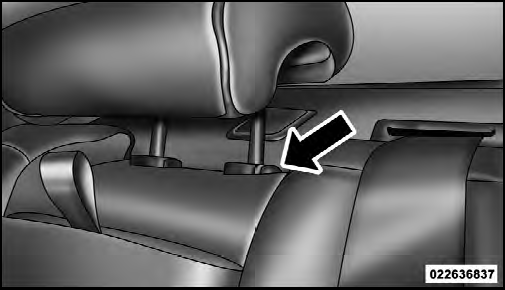
Push Button
NOTE:
The outboard head restraints are not adjustable.
Refer to “Occupant Restraints” in “Things To Know
Before Starting Your Vehicle” for tether routing.
See also:
Gear Ranges
DO NOT race the engine when shifting from PARK or
NEUTRAL into another gear range. ...
SPORT – If Equipped
This mode alters the transmission’s automatic shift
schedule for sportier driving. Upshift speeds are increased
to make full use of available engine power. To
switch between DRIVE and SPORT mo ...
Supplemental Side Air Bag Inflatable Curtain (SABIC)
SABIC air bags may offer side-impact and vehicle rollover
protection to front and rear seat outboard occupants
in addition to that provided by the body structure. Each
air bag features inflated ...