
Recent Calls
You may browse up to 34 of the most recent of each of the following call types:
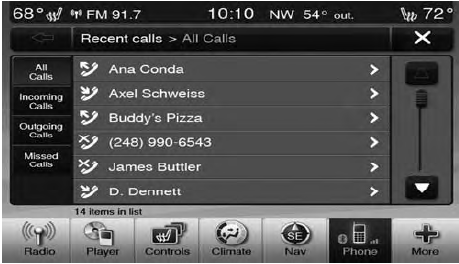
• Incoming Calls
• Outgoing Calls
• Missed Calls
• All Calls
These can be accessed by touching the “recent calls” soft-key on the Phone main screen.
You can also press the  button and
say “Show my
incoming calls” from any screen and the Incoming calls
will be displayed.
button and
say “Show my
incoming calls” from any screen and the Incoming calls
will be displayed.
NOTE:
Incoming can also be replaced with “Outgoing”,
“Recent” or “Missed”.
See also:
Console Features
There is a cubby bin located forward of the shift lever.
The cubby bin is covered with a push-push actuated
door. Push inward on the door to open it, push the door
a second time to close it.
Two ...
EVIC Main Menu
To step to each main menu feature press and release the
MENU button once for each step. A step from the last
item in the list will cause the first item in the feature list
to be displayed. The f ...
Service Contract
You may have purchased a service contract for a vehicle
to help protect you from the high cost of unexpected
repairs after the manufacturer’s New Vehicle Limited
Warranty expires. The manufact ...