
Window Lockout Switch
The window lockout switch on the driver’s door trim panel allows you to disable the window controls on the rear passenger doors and the rear sunscreen (if equipped). To disable the window controls and the rear sunscreen, press and release the window lockout button (setting it in the DOWN position). To enable the window controls and the rear sunscreen, press and release the window lockout button again (setting it in the UP position).
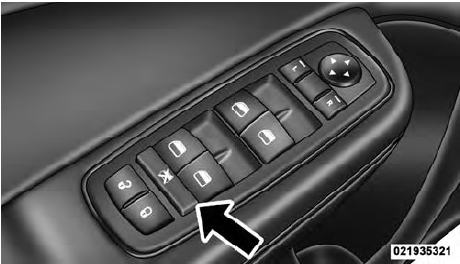
Window Lockout Switch
See also:
SAFETY
The 2011 300C has been named a Top Safety Pick by the Insurance Institute for
Highway Safety. For a car to earn this safety nod, it must receive the highest
score of Good in frontal-offset, side-i ...
Town & Country in the Market
The Town & Country finished last year as the best-selling minivan in the
U.S., and many of those sales were of the outgoing version; the 2011 Town &
Country didn't reach dealerships until ...
Prepare For The Appointment
If you’re having warranty work done, be sure to have the
right papers with you. Take your warranty folder. All
work to be performed may not be covered by the
warranty. Discuss additional charg ...