
Transmitter Battery Replacement
The recommended replacement battery is one CR2032 battery.
NOTE:
• Perchlorate Material — special handling may apply.
See www.dtsc.ca.gov/hazardouswaste/perchlorate
• Do not touch the battery terminals that are on the back
housing or the printed circuit board.
1. Remove the emergency key by sliding the mechanical latch on the back of the RKE transmitter sideways with your thumb and then pull the key out with your other hand.
2. Insert the tip of the emergency key or a #2 flat blade screwdriver into the slot and gently pry the two halves of the RKE transmitter apart. Make sure not to damage the seal during removal.
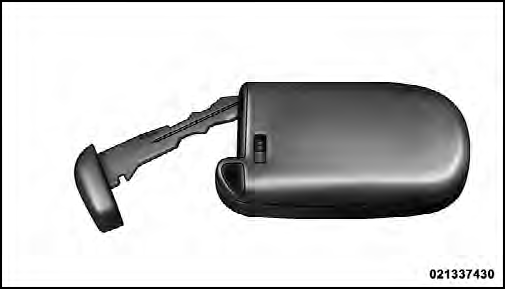
3. Remove the battery by turning the back cover over (battery facing downward) and tapping it lightly on a solid surface such as a table or similar, then replace the battery. When replacing the battery, match the + sign on the battery to the + sign on the inside of the battery clip, located on the back cover. Avoid touching the new battery with your fingers. Skin oils may cause battery deterioration. If you touch a battery, clean it with rubbing alcohol.
4. To assemble the RKE transmitter case, snap the two halves together.
See also:
2011 Chrysler Town & Country Review by Mike Hanley
If you think the minivan segment is DOA, think again. Essentially every
minivan on sale in the U.S. has been redesigned recently, and one of the newest
is the 2011 Chrysler Town & Country, a h ...
Interior Lighting
Interior lights are turned on when a door or liftgate is
opened, the Remote Keyless Entry (RKE) transmitter is
activated, or when the dimmer control is moved to the
extreme top.
The interior li ...
Call Continuation
Call continuation is the progression of a phone call on the
Uconnect™ Phone after the vehicle ignition key has been
switched to OFF. Call continuation functionality available
on the vehicle ca ...