
Instrument Cluster Messages
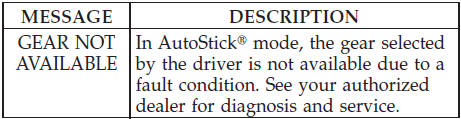
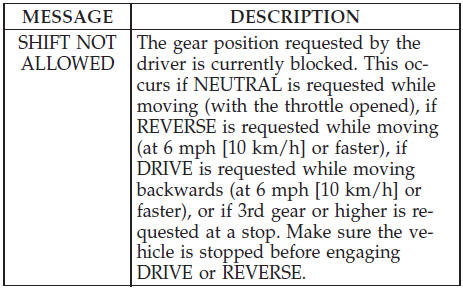
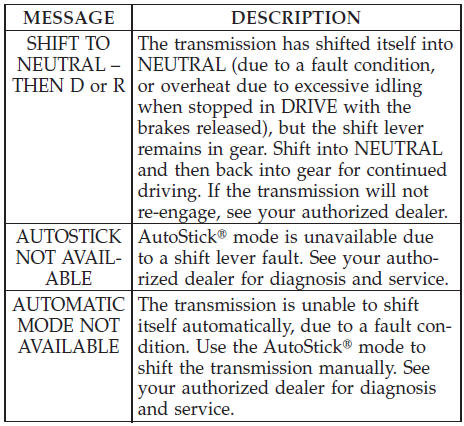
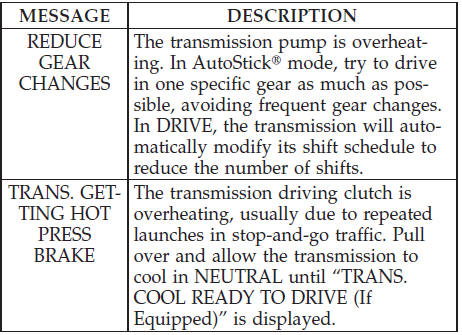
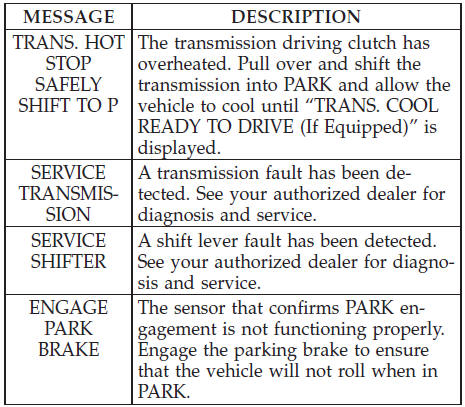
Messages will be displayed in the instrument cluster to alert the driver when certain unusual conditions occur.
These messages are described below.
See also:
Cancel Command
At any prompt, after the beep, you can say “Cancel” and
you will be returned to the main menu.
You can also press the or
buttons when the
system is listening for a command and be returned ...
List Paired Mobile Phone Names
• Press the button to begin.
• After the “Ready” prompt and the following beep, say
“Setup Phone Pairing”.
• When prompted, say “List Phones”.
• The Uconnect™ Phone will pl ...
Operating Instructions — Radio Mode
NOTE:
The ignition switch must be in the ON or ACC
position to operate the radio.
Power Switch/Volume Control (Rotary)
Push the ON/VOLUME control knob to turn on the
radio. Push the ON/VOLUME c ...