
Electronic Speed Control — If Equipped
When engaged, the Electronic Speed Control takes over accelerator operations at speeds greater than 25 mph (40 km/h).
The Electronic Speed Control buttons are located on the right side of the steering wheel.
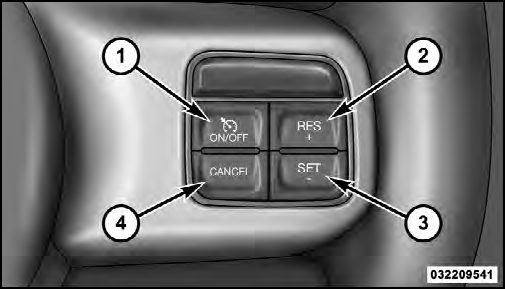
1 — ON/OFF
2 — RES +
3 — SET -
4 — CANCEL
NOTE:
In order to ensure proper operation, the Electronic
Speed Control System has been designed to shut
down if multiple Speed Control functions are operated at
the same time. If this occurs, the Electronic Speed Control
System can be reactivated by pushing the Electronic
Speed Control ON/OFF button and resetting the desired
vehicle set speed.
See also:
Sound Horn With Remote Lock
This feature will cause the horn to chirp when the doors
are locked with the RKE transmitter. This feature can be
turned on or turned off. To change the current setting,
proceed as follows:
• ...
Sleek, Modern Exterior Design, Beautifully Crafted Interior - the Sky is the
Limit
Convertible lovers who seek the fun and open-air freedom of a drop top, but
want the practicality of a car for all seasons and appreciate the sleek styling
of a coupe have the answer to their need ...
To Enter Remote Start Mode
Press and release the REMOTE START button
on the RKE transmitter twice within five seconds.
The parking lights will flash and the horn
will chirp twice (if programmed). Then, the
engine will ...