
Instrument Panel Dimmer
Rotate the center portion of the lever to the extreme bottom position to fully dim the instrument panel lights and prevent the interior lights from illuminating when a door is opened.
Rotate the center portion of the lever up to increase the brightness of the instrument panel lights when the parking lights or headlights are on.
Rotate the center portion of the lever upward to the next detent position to brighten the odometer and radio when the parking lights or headlights are on.
Rotate the center portion of the lever upward to the last detent to turn on the interior lighting.
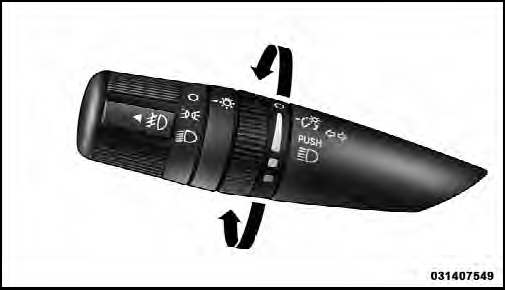
Dimmer Control
See also:
To Deactivate
Asoft tap on the brake pedal, pushing the CANCEL button,
or normal brake pressure while slowing the vehicle will
deactivate Electronic Speed Control without erasing the set
speed memory. Pressin ...
Enhanced Accident Response System
In the event of an impact causing air bag deployment, if
the communication network remains intact, and the
power remains intact, depending on the nature of the
event the ORC will determine wheth ...
Headlamp
1. Raise and prop open the hood. Locate the connector
behind the headlamp.
NOTE:
It may be necessary to remove the air cleaner
filter housing and position the totally integrated power
module a ...