
Automatic Headlights — If Equipped
Turning the end of the multifunction lever to the third detent (AUTO), will activate the automatic headlight system.
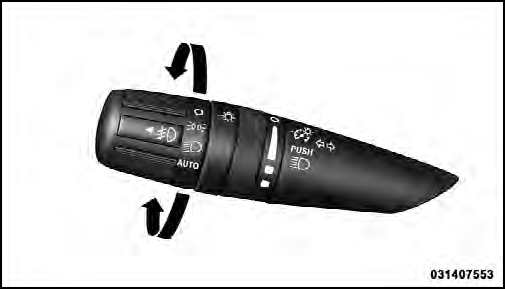
Headlight Switch
With the engine running and the multifunction lever in the AUTO position, the headlights will turn on and turn off based on the surrounding light levels.
See also:
Cruising Range
Because E-85 fuel contains less energy per gallon/liter
than gasoline, you will experience an increase in fuel
consumption. You can expect your miles per gallon
(mpg)/miles per liter and your dr ...
Pinch Protect Feature
This feature will detect an obstruction in the opening of
the sunroof during Express Close operation. If an obstruction
is detected, the sunroof will automatically retract.
Remove the obstruction ...
Adaptive Cruise Control (ACC) Operation
The speed control buttons (located on the right side of the
steering wheel) operates the ACC system.
1 — DISTANCE SETTING
2 — RES +
3 — SET -
4 — CANCEL
5 — ON/OFF
6 — MODE
NOTE ...