
Keyless Enter-N-Go – If Equipped
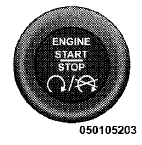
This feature allows the driver to operate the ignition switch with the push of a button, as long as the ENGINE START/STOP button is installed and the Remote Keyless Entry (RKE) transmitter is in the passenger compartment.
Installing And Removing The ENGINE START/STOP Button
Installing The Button
1. Remove the key fob from the ignition switch.
2. Insert the ENGINE START/STOP button into the ignition switch with the lettering facing up and readable.
3. Press firmly on the center of the button to secure it into position.
Removing The Button
1. The ENGINE START/STOP button can be removed from the ignition switch for key fob use.
2. Insert the metal part of the emergency key under the chrome bezel at the 6 o’clock position and gently pry the button loose.
NOTE:
The ENGINE START/STOP button should only
be removed or inserted with the ignition in the LOCK
position (OFF position for Keyless Enter-N-Go).
See also:
2011 Chrysler 200: First Drive
The one vehicle in Chrysler's shrinking lineup in most need of a makeover is
the Sebring midsize sedan. From day one of its last redesign in 2007, it never
seriously challenged the class leaders. ...
Coolant Level
The coolant bottle provides a quick visual method for
determining that the coolant level is adequate. With the
engine OFF and cold, the level of the engine coolant
(antifreeze) in the bottle sho ...
Wind Buffeting
Wind buffeting can be described as the perception of
pressure on the ears or a helicopter-type sound in the
ears. Your vehicle may exhibit wind buffeting with the
windows down, or the sunroof (i ...