
Information Mode Display
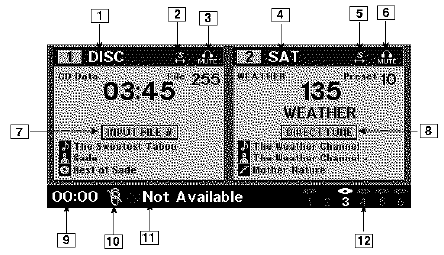
Information Mode Video Screen Display
1. Channel 1 Mode
2. Channel 1 Shared Status
3. Channel 1 Audio Only/Mute
4. Channel 2 Mode
5. Channel 2 Shared Status
6. Channel 2 Audio Only/Mute
7. Channel 1 ENTER Button Action
8. Channel 2 ENTER Button Action
9. Clock
10. Video Lock
11. Not Available / Error
12. Disc Changer Status
See also:
Department Of Transportation Uniform Tire Quality Grades
The following tire grading categories were established by
the National Highway Traffic Safety Administration. The
specific grade rating assigned by the tire’s manufacturer
in each category is ...
Garage Door Opener — If Equipped
HomeLink replaces up to three hand-held transmitters
that operate devices such as garage door openers, motorized
gates, lighting or home security systems. The
HomeLink unit is powered by your ve ...
Setting Memory Positions And Linking RKE Transmitter To Memory
NOTE:
Each time the SET (S) button and a numbered
button (1 or 2) is pressed, you erase the memory settings
for that button and store a new one.
1. Insert the ignition key and turn the ignition ...