
Headphones Operation
The headphones receive two separate channels of audio using an infrared transmitter from the video screen.
Front seat occupants receive some headphone audio coverage to allow them to adjust the headphone volume for the young rear seat occupants that may not be able to do so for themselves.
If no audio is heard after increasing the volume control, verify that the screen is turned on and in the down position and that the channel is not muted and the headphone channel selector switch is on the desired channel. If audio is still not heard, check that fully charged batteries are installed in the headphones.
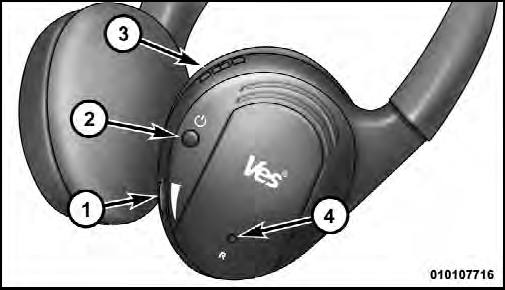
1. Volume Control
2. Power Button
3. Channel Selection Switch
4. Power Indicator
See also:
Clock
After pressing the Clock soft-key the following settings
will be available.
• Sync Time With GPS
When in this display, you may automatically have the
radio set the time. To change the Sync Tim ...
Lane Change Assist
Tap the lever up or down once, without moving beyond
the detent, and the turn signal (right or left) will flash
three times then automatically turn off. ...
Lights
After pressing the Lights soft-key the following settings
will be available.
• Headlight Illumination On Approach
When this feature is selected, the headlights will activate
and remain on for ...