
Supported MP3 File Formats
The radio will recognize only files with the *.MP3 extension as MP3 files. Non-MP3 files named with the *.MP3 extension may cause playback problems. The radio is designed to recognize the file as an invalid MP3 and will not play the file.
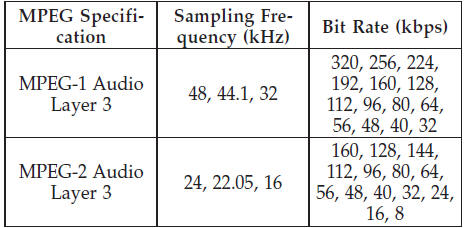
When using the MP3 encoder to compress audio data to an MP3 file, the bit rate and sampling frequencies in the following table are supported. In addition, variable bit rates (VBR) are also supported. The majority of MP3 files use a 44.1 kHz sampling rate and a 192, 160, 128, 96 or VBR bit rate.
ID3 Tag information for artist, song title, and album title are supported for version 1 ID3 tags. ID3 version 2 is not supported by the radios.
Playlist files are not supported. MP3 Pro files are not supported.
See also:
Troubleshooting Tips
If you are having trouble programming HomeLink , here
are some of the most common solutions:
• Replace the battery in the original hand-held transmitter.
• Press the LEARN button on the Garage ...
Heated Seats — If Equipped
There are two heated seat switches that allow the driver
and passenger to operate the seats independently. The
controls for each heater are located on the center of the
instrument panel (above t ...
Fog Lamp
NOTE:
Access to the fog lamp bulb is from the rear of the
fascia. On the left rear side of the fascia, remove the push
pin and lower the hinged access door on the air dam.
1. From behind the bum ...