
Electronic Vehicle Information Center (EVIC) — If Equipped
The Electronic Vehicle Information Center (EVIC) features a driver-interactive display that is located in the instrument cluster.
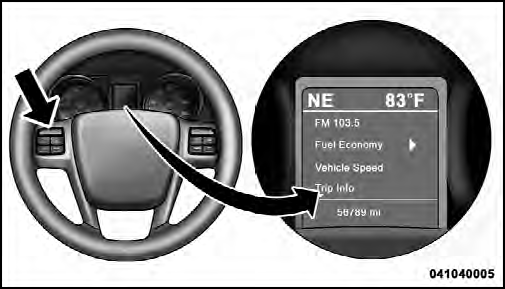
Electronic Vehicle Information Center (EVIC)
This system conveniently allows the driver to select a
variety of useful information by pressing the switches
mounted on the steering wheel. The EVIC consists of the
following:
• Radio Information
• Fuel Economy
• Vehicle Speed
• Trip Info
• Tire PSI
• Vehicle Info
• Messages
• Units
• System Setup (Personal Settings)
• Turn Menu Off
The system allows the driver to select information by pressing the following buttons mounted on the steering wheel:
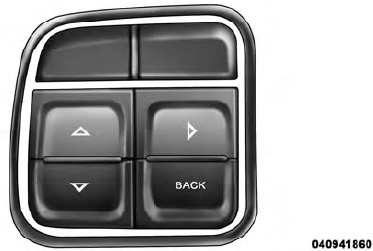
EVIC Steering Wheel Buttons
UP Button

Press and release the UP button to scroll upward through the main menus (Fuel Economy, Vehicle Info, Tire PSI, Cruise, Messages, Units, System Setup) and sub-menus.
DOWN Button

Press and release the DOWN button to scroll downward through the main menus and submenus.
SELECT Button

The SELECT button allows access to information in EVIC submenus, selects some feature settings, and resets some EVIC features. The EVIC prompts the driver when the SELECT button can be used by displaying the right arrow graphic.
BACK Button

Press the BACK button to scroll back to a previous menu or sub-menu.
See also:
Operation
When the shift lever is in the AutoStick position (below
the DRIVE position), it can be moved from side to side.
This allows the driver to manually select the transmission
gear being used. Moving ...
Headlight Time Delay
This feature provides the safety of headlight illumination
for up to 90 seconds (programmable) when leaving your
vehicle in an unlit area.
To activate the delay feature, place the ignition in the ...
Electronic Speed Control — If Equipped
When engaged, the Electronic Speed Control takes over
accelerator operations at speeds greater than 25 mph
(40 km/h).
The Electronic Speed Control buttons are located on the
right side of the s ...