
How The Active Head Restraints (AHR) Work
The Occupant Restraint Controller (ORC) determines whether the severity, or type of rear impact will require the Active Head Restraints (AHR) to deploy. If a rear impact requires deployment, both the driver and front passenger seat AHRs will be deployed.
When AHRs deploy during a rear impact, the front half of the head restraint extends forward to minimize the gap between the back of the occupant’s head and the AHR.
This system is designed to help prevent or reduce the extent of injuries to the driver and front passenger in certain types of rear impacts.
NOTE:
The Active Head Restraints (AHR) may or may
not deploy in the event of a front or side impact.
However if during a front impact, a secondary rear impact occurs, the AHR may deploy based on the severity and type of the impact.
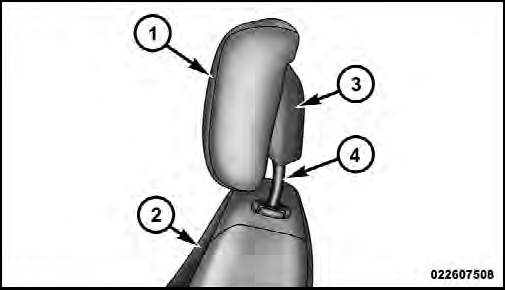
Active Head Restraint (AHR) Components
1 — Head Restraint Front Half (Soft Foam and Trim)
2 — Seatback
3 — Head Restraint Back Half (Decorative Plastic Rear Cover)
4 — Head Restraint Guide Tubes
CAUTION!
All occupants, including the driver, should not operate
a vehicle or sit in a vehicle’s seat until the head
restraints are placed in their proper positions in order
to minimize the risk of neck injury in the event of an
accident.
NOTE:
For more information on properly adjusting and
positioning the head restraint, refer to “Adjusting Active
Head Restraints” in “Understanding The Features Of
Your Vehicle”.
See also:
Jacking Instructions
WARNING!
Carefully follow these tire changing warnings to
help prevent personal injury or damage to your
vehicle:
• Always park on a firm, level surface as far from
the edge of the roadway ...
Air Bag Warning Light
The light should come on and remain on for four to eight
seconds as a bulb check when the ignition switch is first
turned ON. If the light is not lit during starting, see your
authorized dealer. ...
200 in the Market
Chrysler drained a lot of bathwater, but this is an instance where the baby
needed to go. CEO Sergio Marchionne told us last January that the company was
working to give the 200 upgrades that refl ...