
Electronic Speed Control — If Equipped
When engaged, the Electronic Speed Control takes over accelerator operations at speeds greater than 25 mph (40 km/h).
The Electronic Speed Control buttons are located on the right side of the steering wheel.
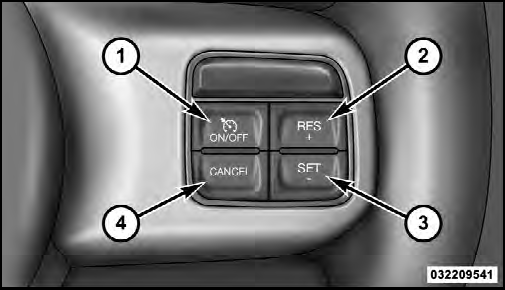
1 — ON/OFF
2 — RES +
4 — CANCEL
3 — SET -
NOTE:
In order to ensure proper operation, the Electronic
Speed Control System has been designed to shut down if
multiple Speed Control functions are operated at the same
time. If this occurs, the Electronic Speed Control System can
be reactivated by pushing the Electronic Speed Control
ON/OFF button and resetting the desired vehicle set speed.
See also:
Customer Key Programming
You can program new keys to the system if you have two
valid Sentry Keys by performing the following procedure:
1. Cut the additional Sentry Key Transponder blank(s)
to match the ignition switch ...
Tilt Mirrors In Reverse (Available With Memory Seat Only) — If Equipped
Tilt Mirrors in Reverse provides automatic outside mirror
positioning which will aid the drivers view of the ground
rearward of the front doors. The driver’s outside mirror
will move slightly ...
Without The Ignition Key
Special care must be taken when the vehicle is towed
with the ignition in the LOCK position. Flatbed towing is
the preferred towing method. However, if a flatbed
towing vehicle is not available, ...