
Power Mirrors — If Equipped
The power mirror controls are located on the driver-side door trim panel.
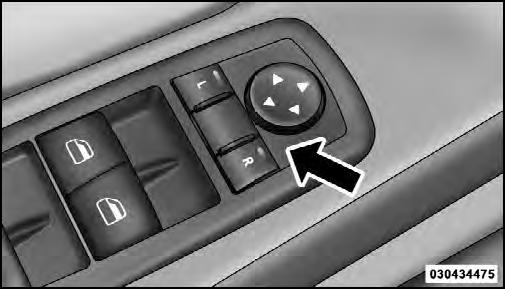
Power Mirror Controls
The power mirror controls consist of mirror select buttons and a four-way mirror control switch. To adjust a mirror, press either the L (left) or R (right) to select the mirror that you want to adjust.
NOTE:
A light in the selected button will illuminate
indicating the mirror is activated and can be adjusted.
Using the mirror control switch, press on any of the four arrows for the direction that you want the mirror to move.
Driver’s side power mirror preselected positions can be controlled by the optional Driver Memory Seat Feature.
Refer to “Driver Memory Seat” in “Understanding The Features Of Your Vehicle” for further information.
See also:
SET Button – To Set the Pushbutton Memory
When you are receiving a channel that you wish to
commit to pushbutton memory, press the SET button.
The symbol SET 1 will now show in the display window.
Select the button (1-6) you wish to lock ...
SETUP Button
Pressing the SETUP button allows you to select the
following items:
• Display Sirius ID number — Press the AUDIO/
SELECT button to display the Sirius ID number. This
number is used to activ ...
Heated Steering Wheel — If Equipped
The steering wheel contains a heating element that helps
warm your hands in cold weather. The heated steering
wheel has only one temperature setting. Once the heated
steering wheel has been turn ...