
Transmitter Battery Replacement
The recommended replacement battery is one CR2032 battery.
NOTE:
• Perchlorate Material — special handling may apply.
See www.dtsc.ca.gov/hazardouswaste/perchlorate
• Do not touch the battery terminals that are on the back
housing or the printed circuit board.
1. Remove the emergency key by sliding the mechanical latch at the top of the RKE transmitter sideways with your thumb and then pull the key out with your other hand.
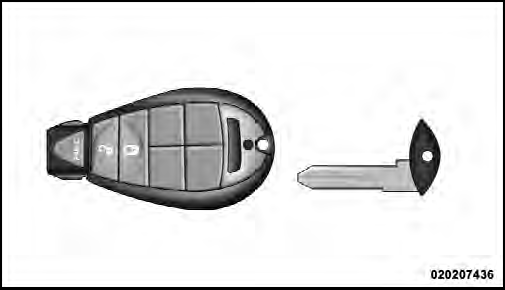
Emergency Key Removal
2. Insert the tip of the emergency key or a #2 flat blade screwdriver into the slot and gently pry the two halves of the RKE transmitter apart. Make sure not to damage the seal during removal.
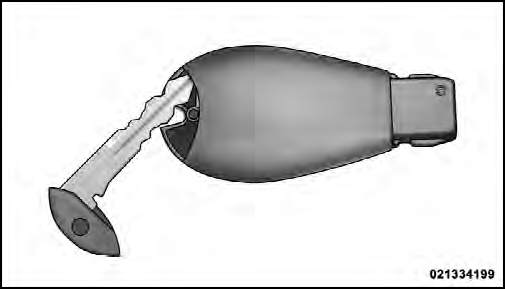
Inserting Emergency Key Into Slot
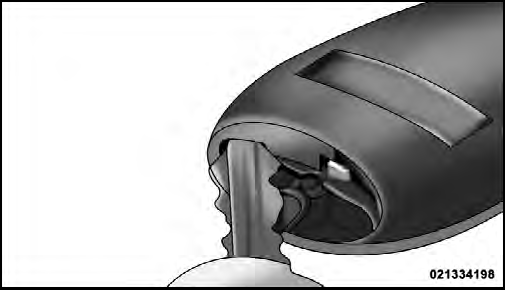
Separating RKE Transmitter
3. Remove and replace the battery. When replacing the battery, match the + sign on the battery to the + sign on the inside of the battery clip, located on the back cover.
Avoid touching the new battery with your fingers. Skin oils may cause battery deterioration. If you touch a battery, clean it with rubbing alcohol.
4. To assemble the RKE transmitter case, snap the two halves together.
See also:
Inserting Compact Disc(s)
Gently insert one CD into the CD player with the CD
label facing up. The CD will automatically be pulled into
the CD player and the CD icon will illuminate on the
radio display. If a CD does not ...
Headlight Time Delay
This feature provides the safety of headlight illumination
for up to 90 seconds (programmable) when leaving your
vehicle in an unlit area.
To activate the delay feature, place the ignition in the ...
Power Seats — If Equipped
The power seat switches are on the outboard side of the
seat near the floor. Use the bottom switch to move the
seat up, down, forward, rearward, or to tilt the seat. The
top switch controls the ...