
Wireless Ignition Node (WIN)
The Wireless Ignition Node (WIN) operates similarly to an ignition switch. It has four operating positions, three with detents and one that is spring-loaded. The detent positions are OFF, ACC, and ON/RUN. The START position is a spring-loaded momentary contact position.
When released from the START position, the switch automatically returns to the ON/RUN position.
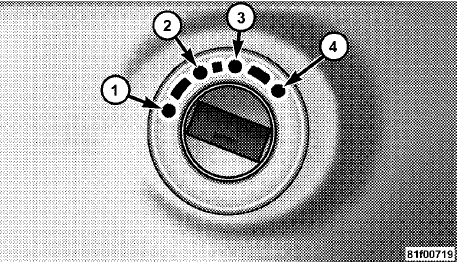
1 — OFF
2 — ACCESSORY
3 — ON/RUN
4 — START
See also:
Without The Ignition Key Fob
Special care must be taken when the vehicle is towed
with the ignition in the OFF position. The only approved
method of towing without the ignition key fob is with a
flatbed truck. Proper towing ...
Door Trim Panel Storage
Front Door Storage
Both interior front door panels have multiple pockets for
storage.
WARNING!
If containers of hot liquid are placed in the bottle
holder, they can spill when the door is close ...
Hill Start Assist (HSA)
The HSA system is designed to assist the driver when
starting a vehicle from a stop on a hill. HSA will maintain
the level of brake pressure the driver applied for a short
period of time after t ...