
License Lamp
1. Remove the screws securing the lamp to the rear fascia.
2. Remove the bulb and socket assembly.
3. Disconnect the bulb from the socket assembly and install the replacement bulb.
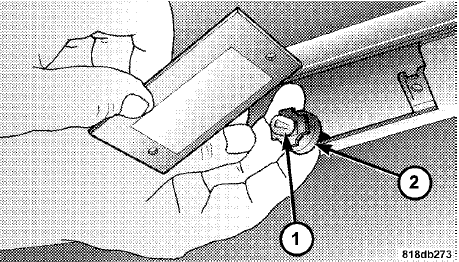
1 — License Lamp Bulb
2 — Socket
4. Reinstall the bulb and socket assembly.
5. Reattach the lamp to the rear fascia, and then install the screws.
See also:
Operation Instructions — CD Mode For CD And MP3 Audio Play
NOTE:
• The ignition switch must be in the ON or ACC
position to operate the radio.
• This radio is capable of playing compact discs (CD),
recordable compact discs (CD-R), rewritable compact ...
Tire Inflation Pressures
The proper cold tire inflation pressure is listed on the
driver’s side “B” Pillar or rear edge of the driver’s side
door.
Some vehicles may have Supplemental Tire Pressure
Information f ...
Compressed Audio Files (MP3 and WMA)
The DVD player is capable of playing MP3 (MPEG-1
Audio Layer 3) and WMA (Windows Media Audio) files
from a CD Data disc (usually a CD-R or CD-RW).
• The DVD player always uses the file extensio ...