
Preparations For Jump-Start
The battery is stored under an access cover in the trunk.
Remote battery posts are located on the right side of the engine compartment for jump-starting.
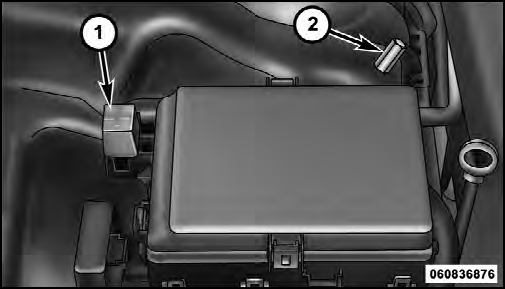
Remote Battery Posts
1 — Remote Positive (+) Post<>
2 — Remote Negative (-) Post
WARNING!
• Take care to avoid the radiator cooling fan whenever
the hood is raised. It can start anytime the
ignition switch is on. You can be injured by
moving fan blades.
• Remove any metal jewelry such as watch bands or
bracelets that might make an inadvertent electrical
contact. You could be seriously injured.
• Batteries contain sulfuric acid that can burn your
skin or eyes and generate hydrogen gas which is
flammable and explosive. Keep open flames or
sparks away from the battery.
1. Set the parking brake, shift the automatic transmission into PARK and turn the ignition to LOCK.
2. Turn off the heater, radio, and all unnecessary electrical accessories.
3. If using another vehicle to jump-start the battery, park the vehicle within the jumper cables reach, set the parking brake and make sure the ignition is OFF.
WARNING!
Do not allow vehicles to touch each other as this
could establish a ground connection and personal
injury could result.
See also:
Making A Second Call While Current Call Is In Progress
To make a second call while you are currently on a call,
press the button and say “Dial” or
“Call” followed
by the phone number or phonebook entry you wish to
call. The first call wil ...
Smartbeam™ — If Equipped
The SmartBeam™ system provides increased forward
lighting at night by automating high beam control
through the use of a digital camera mounted on the
inside rearview mirror. This camera detect ...
Rearming Of The System
If something triggers the alarm, and no action is taken to
disarm it, the Vehicle Security Alarm will turn the horn
off after three minutes, turn all of the visual signals off
after 15 additiona ...