
Instrument Panel Features
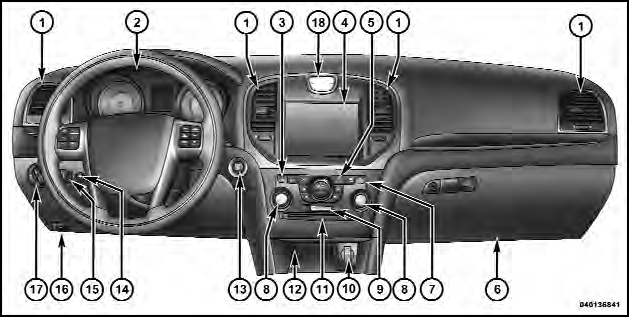
Instrument Panel Features
1 — Air Outlet
2 — Instrument Cluster
3 — Hazard Switch
4 — Uconnect Touch™ System
5 — Climate Control Hard Controls
6 — Glove Compartment
7 — ESC Off Switch
8 — Uconnect Touch™ System Hard Controls
9 — SD Memory Card Slot
10 — Power Outlet
11 — CD/DVD Slot
12 — Storage Compartment
13 — Engine Start/Stop Button
14 — Trunk Release Button
15 — Dimmer Controls
16 — Hood Release
17 — Headlight Switch
18 — Analog Clock
See also:
In Canada
If you believe that your vehicle has a safety defect, you
should contact the Customer Service Department immediately.
Canadian customers who wish to report a safety
defect to the Canadian governm ...
Adding Washer Fluid
The windshield washer fluid reservoir is located in the
front of the engine compartment. Be sure to check the
fluid level at regular intervals. Fill the reservoir with
windshield washer solvent ...
Managing Your Favorite Phonebook
There are three ways you can add an entry to your
Favorite Phonebook.
1. During an active call of a number to make a favorite,
touch and hold a favorite button on the top of the phone
main scre ...